INCIDENT-TO-ACTION OPERATIONS
Respond now.
Improve what
happens next.
Intellilox connects incidents, actions, policies, and enterprise risk—so operational evidence improves how your organisation governs, trains, and prevents recurrence.
IRQAOP+
One shared record for response,
assurance, and leadership.
INTELLILOX
LIVE OPERATIONS
Command centre
OPERATIONS PULSEResponse activity
Resolved Incoming
08:0010:0012:0014:0016:00Now
Priority queueView all
Tracker updateAction owner assigned · 8 min ago
HighTime entry approvedTime Management · 18 min ago
Complete0%
Up 6% this quarterOne operating system. Every handoff connected.
INCIDENTSCAPAPOLICIESRISKSDASHBOARDS
ONE SYSTEM OF RECORD
Manage the event.
Keep the learning.
Incident management is broader than a technical response. It connects reporting, business impact, decisions, communications, evidence, recovery, and the improvements that follow. Intellilox keeps that complete operating history together.
Explore the incident lifecycle →CAPTURE THE FACTS
Report without losing context.
Record what happened, who and what was affected, when it occurred, severity, location, witnesses, and supporting evidence.
COORDINATE THE RESPONSE
Make ownership unambiguous.
Assign response owners, log decisions and actions, preserve the incident timeline, and keep internal and external communications deliberate.
PROVE THE IMPROVEMENT
Close the loop, not just the record.
Connect root cause, corrective and preventive actions, due dates, evidence, effectiveness checks, and verified closure.
SIX CONNECTED PHASES
A repeatable path
through disruption.
The six-phase view separates urgent control from durable improvement while preserving a single incident history across response, recovery, closure, and continuous improvement.
ONE CONNECTEDIncident
lifecycleContinuous improvement
lifecycleContinuous improvement
01PreparePlan & prepare
02Identify & reportDetection & reporting
03Assess & containAssessment & decision
04Eradicate & respondResponse
05Recover & closeRecovery & closure
06Learn & improveLessons management
INCIDENT MANAGEMENT IN PRACTICE
One live view.
Every critical signal.
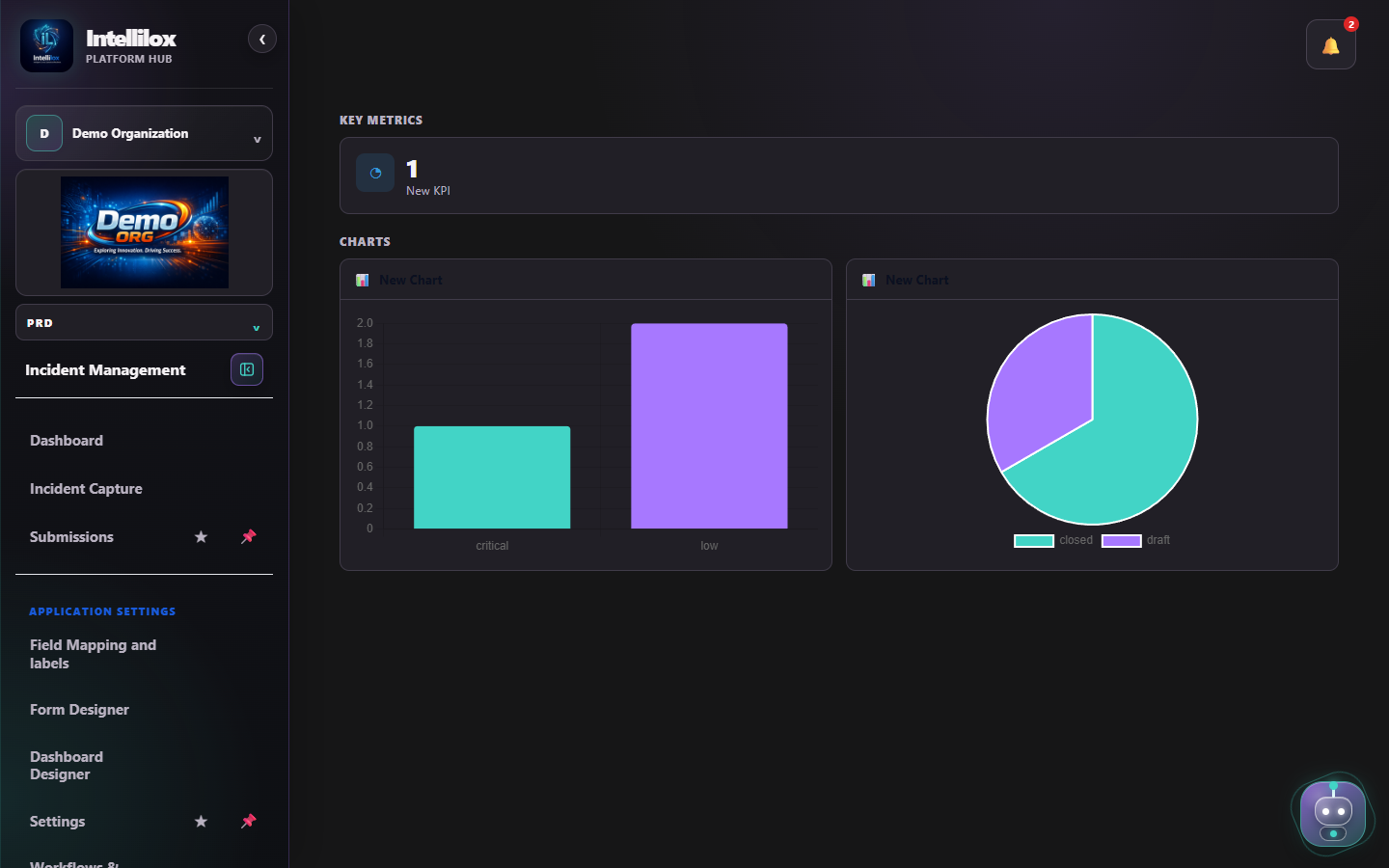
The Demo Organization workspace shows the same configurable dashboard your response team uses: role-aware navigation, live KPI cards, severity and status analysis, incident capture, submissions, workflows, form design, and settings.
CAPA + TRACKER
Find the cause.
Own the change.
Corrective action removes the cause of a detected problem. Preventive action reduces the chance of the same or a related problem occurring elsewhere. Both need evidence that the action was implemented and effective.
Open Tracker in the demo workspace ↗INCIDENTCapture the event
Facts, impact, evidence, containment, and decisions stay attached to the source record.
investigate
ROOT CAUSEUnderstand why
Record contributing factors and a defensible root-cause analysis before choosing the long-term response.
handoff
TRACKERCreate owned CAPA actions
Send actions directly from the incident to Tracker with priority, assignee, due date, implementation date, and tailored fields.
verify
EFFECTIVENESSProve the fix held
Track completion, evidence, overdue work, recurrence, and approval before verified closure.
The accountable work layer across Intellilox.
Tracker is not another incident register. It is the focused workspace for actions, issues, findings, improvements, and follow-up work raised by incidents or other applications.
- One ownerClear responsibility and due date for every action.
- One statusVisible progress, escalation, and overdue work.
- One evidence trailImplementation notes and proof remain connected.
- One source linkNavigate from the action back to the originating incident.
CLOSED-LOOP IMPROVEMENT
An incident is more
than a record to close.
Incident data is direct evidence of how work actually happens. Patterns reveal where policy is unclear, controls are weak, training is not landing, or an emerging risk is missing from the enterprise view.
Intellilox turns that evidence into governed change—then uses future data to test whether the change worked.- 01Incident signalCapture facts, frequency, impact, location, and investigation outcomes.Creates structured, decision-ready evidence.→
- 02Pattern identifiedSee recurrence and contributing factors across records, sites, and teams.Reveals recurrence across sites and teams.→
- 03Governance reviewedAssess policy relevance, control effectiveness, training, and risk coverage.Tests policy, controls, training, and risk.→
- 04Change ownedApprove updates, assign actions, communicate expectations, and treat risk.Assigns an action and accountable owner.→
- 05Effectiveness verifiedMonitor new incidents and confirm whether recurrence and exposure decline.Proves whether exposure is trending down.
POLICY MANAGER
Keep policy aligned
with reality.
Policies should evolve when operational evidence shows they are unclear, outdated, or routinely bypassed. Connect the incident pattern to the policy owner, review decision, approved revision, communication, and training record.
- DetectUse incident trends to identify policy gaps and non-compliance.
- DecidePreserve why a policy was retained, clarified, or changed.
- EmbedAssign communication and training actions with evidence of completion.
Policy Manager product screen
Final application imagery is being prepared.
IMAGE PLACEHOLDERA repeated behaviour becomes a focused intervention.
EvidenceIncidents show employees frequently travel on Sundays without management approval.
Policy insightThe policy prohibits Sunday travel, but recurrence shows the requirement is not being consistently understood or enforced.
ImprovementThe manager reinforces approval controls, targets additional training, and monitors future incidents to confirm compliance improves.
An investigation exposes a policy gap.
EvidenceNetwork breaches recur at one site, with investigations confirming the use of unapproved AI tools.
Policy insightThe responsible AI policy requires safe use but does not define which tools are approved or how exceptions are authorised.
ImprovementThe policy is updated with an approved-tool register, clear approval rules, ownership, and role-based training.
ENTERPRISE RISK REGISTER
Let real events sharpen
the risk picture.
When incidents reveal a material exposure that is missing or understated, create or update the enterprise risk directly from the evidence. Keep the source incidents, control gaps, treatment actions, owners, residual risk, and review dates connected.
INCIDENT-LED RISK DISCOVERYRepeated unapproved AI use is not only a technology issue.
It can create data leakage, privacy, intellectual property, regulatory, and operational risks. Recording it in the enterprise risk register makes the exposure visible, owned, assessed, and treated.
Risk Register product screen
Final application imagery is being prepared.
IMAGE PLACEHOLDER01Recognise
Convert repeated incident evidence into a clearly described enterprise risk.
Creates an owned risk statement.02Assess
Evaluate likelihood, consequence, existing controls, and current exposure.
Scores inherent and residual exposure.03Treat
Assign control, policy, technology, and training actions to accountable owners.
Connects controls, actions, and owners.04Monitor
Use new incidents and control evidence to reassess residual risk over time.
Tests whether treatment still works. PLUG-AND-PLAY FRAMEWORKS
Start with structure.
Stay in control.
Launch a proven framework as an operational workflow—not another static document. Configure it for your obligations, terminology, risk appetite, roles, and evidence requirements while preserving a consistent baseline.
FRAMEWORK CATALOGReady to configure
01
Incident managementLifecycle, roles, evidence, decisions, review
INSTALL02
CAPA workflowRoot cause, actions, effectiveness, closure
INSTALL03
Organisation templateYour fields, language, controls, and approvals
IMPORTSelect a framework from the catalog and bring its pages, fields, and evidence structure into your workspace.
Use the shared Form Designer to adjust labels, required fields, conditions, attachments, and routing.
Capture records, enforce the workflow, connect actions, and surface evidence through dashboards and audit history.
Intellilox helps organisations operationalise and evidence their chosen frameworks. It does not claim that installing a template alone creates certification or guarantees compliance.
CONFIGURABLE OPERATIONAL INTELLIGENCE
Design the dashboard
your decisions need.
Authorised users assemble KPI cards, chart rows, text, and slicers from native and custom fields. The mockup below follows the live Dashboard Designer’s layout and visual language.
Incidents by lifecycle phaseLIVE
CAPA effectivenessQUARTER
81%
- Effective 17
- Pending check 3
- Reopened 1
Priority Tracker actionsVIEW ALL →
ActionSourceOwnerDueStatus
Validate revised isolation procedureINC-00184M. Chen22 JulIN PROGRESS
Complete effectiveness samplingINC-00176A. Singh19 JulOVERDUE
CONNECTED APPLICATIONS
Start with incidents.
Extend without silos.
Shared identity, permissions, forms, dashboards, and action tracking create one consistent way to operate.
01→02→03→04→05→06→
Incident Management
Capture, assess, respond, recover, and learn.
Tracker
Own actions, findings, issues, and improvements.
Policy Manager
Turn operational evidence into relevant policy and training.
Risk Register
Identify, assess, treat, and monitor enterprise risk.
Expense Manager
Connect claims, approvals, exceptions, and evidence.
Timesheet
Link time and effort to operational outcomes.
Built for teams that need the record to stand up after the pressure has passed
01connected incident and action history
02configurable workflows and dashboards
03evidence-ready framework operations
FIVE DAYS. YOUR WORKSPACE.
Try Intellilox
with your team.
Select the applications you want to evaluate. After you verify your corporate email, we create a controlled trial workspace with five user seats. The workspace automatically deactivates after five days.
- 01Controlled accessIsolated organization and trial workspace
- 02Five seatsInvite up to four colleagues during the trial
- 03Automatic expiryOrganization and active sessions deactivate after five days
Already trialled Intellilox? Contact [email protected].
TRY IT FOR FREECreate your trial requestAll fields are required.